Galaxy Note 8 Tip: S Pen Translate will make your life easier
The Galaxy Note 8 has several features that will make your life easier and S Pen Translate is one of them. As the name suggests, the feature enables you to perform text translations quickly using the handset’s stylus. This feature was also present on the short-lived Galaxy Note 7 and it’s nice to see that it has stuck around for the Galaxy Note 8 as well.
We highlight such features in our extensive coverage of Galaxy Note 8 Tips & Tricks. One cool Galaxy Note 8 feature we recently covered lets you hover S Pen to easily scroll in apps.
Galaxy Note 8 Tip: S Pen Translate
Step 1: The S Pen Translate feature can be accessed by opening Air Command.
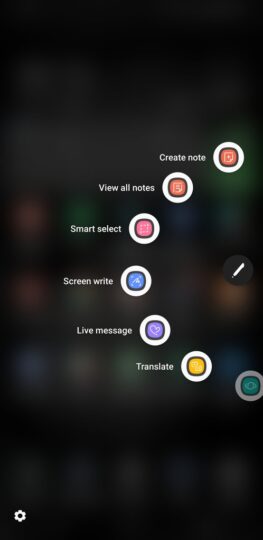
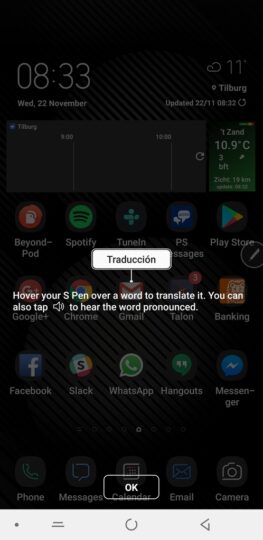
Step 2: Tap on Translate.
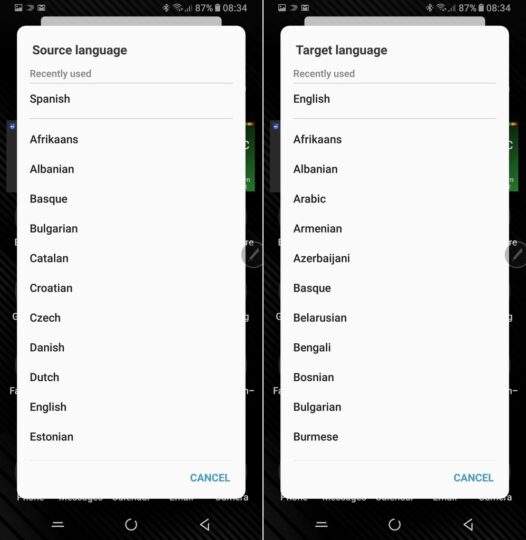
Step 3: Select the Source language and the Target language.
Step 4: Hover the S Pen over the text that you want to translate.
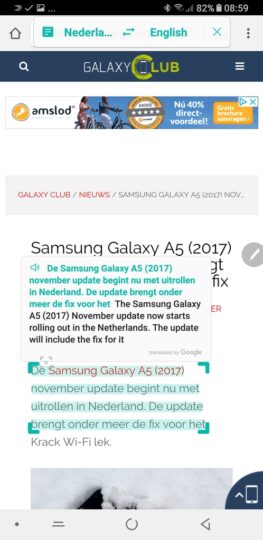
That’s just how simple this is. It’s also possible to translate an entire sentence. Just tap on the teal button in the translation box and highlight the sentence. The translation feature is powered by Google and it works for webpages and documents.
Bonus Tip
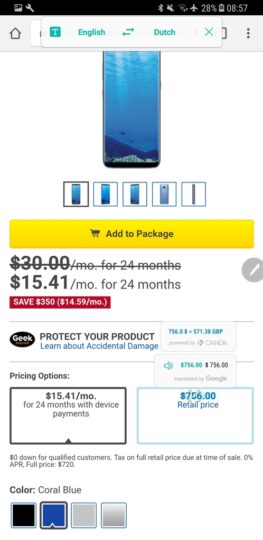
Seamless currency conversion is also built into this feature. Highlight any currency on the screen and it will be converted into your primary currency automatically. The primary currency is determined by the language and country selection.
So if it’s English and the US respectively, your primary currency will be USD. This feature is powered by Oanda. Do keep in mind that it takes a few seconds for the conversion to show up.
The post Galaxy Note 8 Tip: S Pen Translate will make your life easier appeared first on SamMobile.


